
Facilitator: A Copilot AI Agent for Microsoft Teams Meetings


In the world of Generative Artificial Intelligence, an "Agent" is a piece of software that acts on your behalf to achieve a goal or end result using AI.
Agents are a big deal and becoming a key component to useful and functional AI solutions that can do more than just answer a few questions.
Recently Microsoft has rolled out the "Facilitator" Agent into Microsoft Teams.
It can transcribe meetings, take notes, create action items, provide meeting recaps, and even create a mini podcast about your meeting to make it easy to catch up while on the go!
Let's take a look.
Enabling Facilitator
Facilitator requires a Microsoft Copilot license, as long as the host of a Teams Meeting has this license the feature is available. While not required, putting some kind of agenda in your meeting can keep it organized as well as provide Facilitator with insight on the goal or intended flow of your meeting.
It is enabled as an option to a scheduled meeting:
(If you do not see the same options as these screenshots, verify that you have the correct license.)
In Outlook

Create a new meeting in Outlook
Select to make it a "Teams Meeting"
Select to turn on Facilitator
If you don't see the option, click options -> "Copilot and other AI" -> Turn on Facilitator
In Teams - When Scheduling a Meeting

Create a new Scheduled Event
Make sure you toggle it to be a "Teams Meeting" if it isnt' by default
Select to turn on "Facilitator"
If you don't see the option, click options -> "Copilot and other AI" -> Turn on Facilitator
In Teams - Enabled During a Scheduled Meeting

Join the scheduled meeting
Select "..." more
Select "Turn on Facilitator"
With it enabled, transcription and notes features will also be enabled, and Facilitator will get to work with its Meeting tasks.
Facilitator Enabled. Now what?
During the meeting, you'll see star icons to indicate AI is being used in the meeting. You can use Copilot during the meeting to interact with AI, but Facilitator will work automatically to bring things together.
Facilitator will begin to take notes and update as the meeting progresses automatically:

At the end of your meeting, Facilitator will finish its tasks and send you a message in Teams with a full summary:

Additionally, you'll get a message with a "recap" of the meeting:

This recap will include notes, summaries, transcriptions, and more:
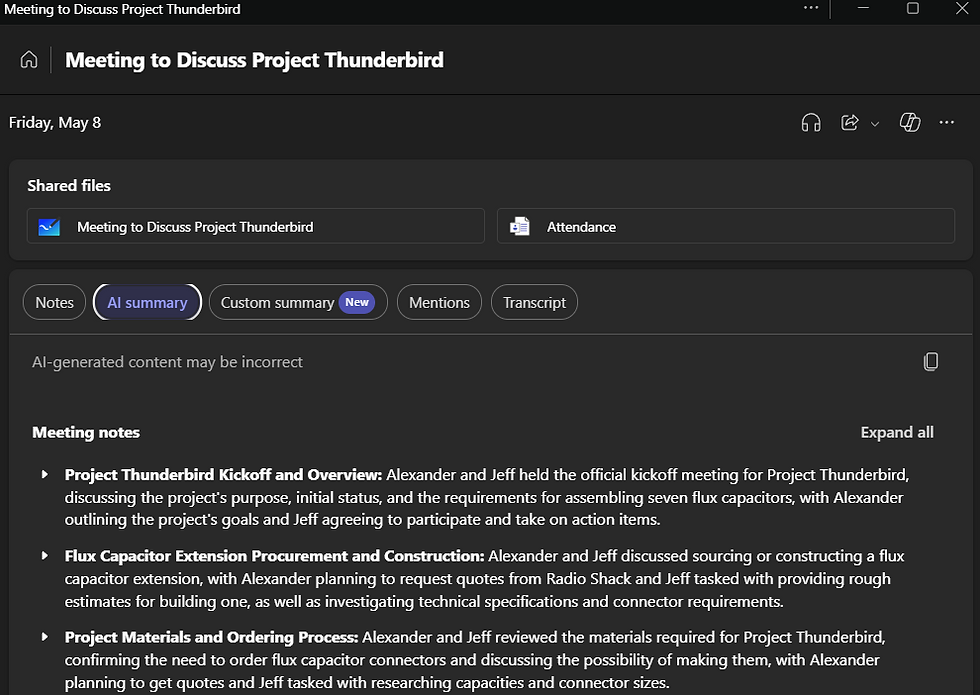
When possible, it will even include suggestions for follow up tasks based on the meeting:

It can even provide an audio recap of a meeting, essentially a mini podcast:

The recap can be shared (following your organization's sharing policies):

Well, that's pretty cool! Is it safe to use?
The quick answer is, yes. However, make sure your organization has approved it for usage.
Meeting AI is a topic every business should have a policy for. It's a very useful tool that can improve your meetings in progress and provide useful documentation and follow up steps post meeting. As these tools become more common, employees may use them without realizing when they can record, capture, and store data offsite. Businesses should educate staff, so they know when to request AI be disabled in sensitive situations.
Facilitator is designed to align with your company’s security and compliance policies, making it a more controlled alternative to typical Meeting AI tools. Files it creates are stored in your work profile on your company’s systems. The data is owned by your identity and organization, not an outside service. It follows Microsoft’s data security and privacy standards, and your data is not used to train models.
It is a safe AI solution, but check with your manager and/or IT department for clarity on when and when not to use it.
Wrap-Up
Facilitator is an agent that can do more than what we showed in this post. Microsoft is rolling out new features.
Down the road you'll be able to interact with it more during and after a meeting, request it to create documents tied to the meeting and much more.
Click here, for more training on Facilitator. For a quick video showing Facilitator in action, click here.
Interested in having a conversation about technology in your business?
Send in a contact request or email info@aevotec.com.


